Use Claude in the Chrome you are already signed into
Most browser agents open a fresh, signed-out Chromium. MCP Browser Extension works the other way: a Chrome extension connects your normal browser to Claude Code, Claude Desktop or any MCP host, so the agent sees your Gmail, GitHub and dashboards exactly as you do. No re-login, no 2FA twice, no cookies pasted into a config file.
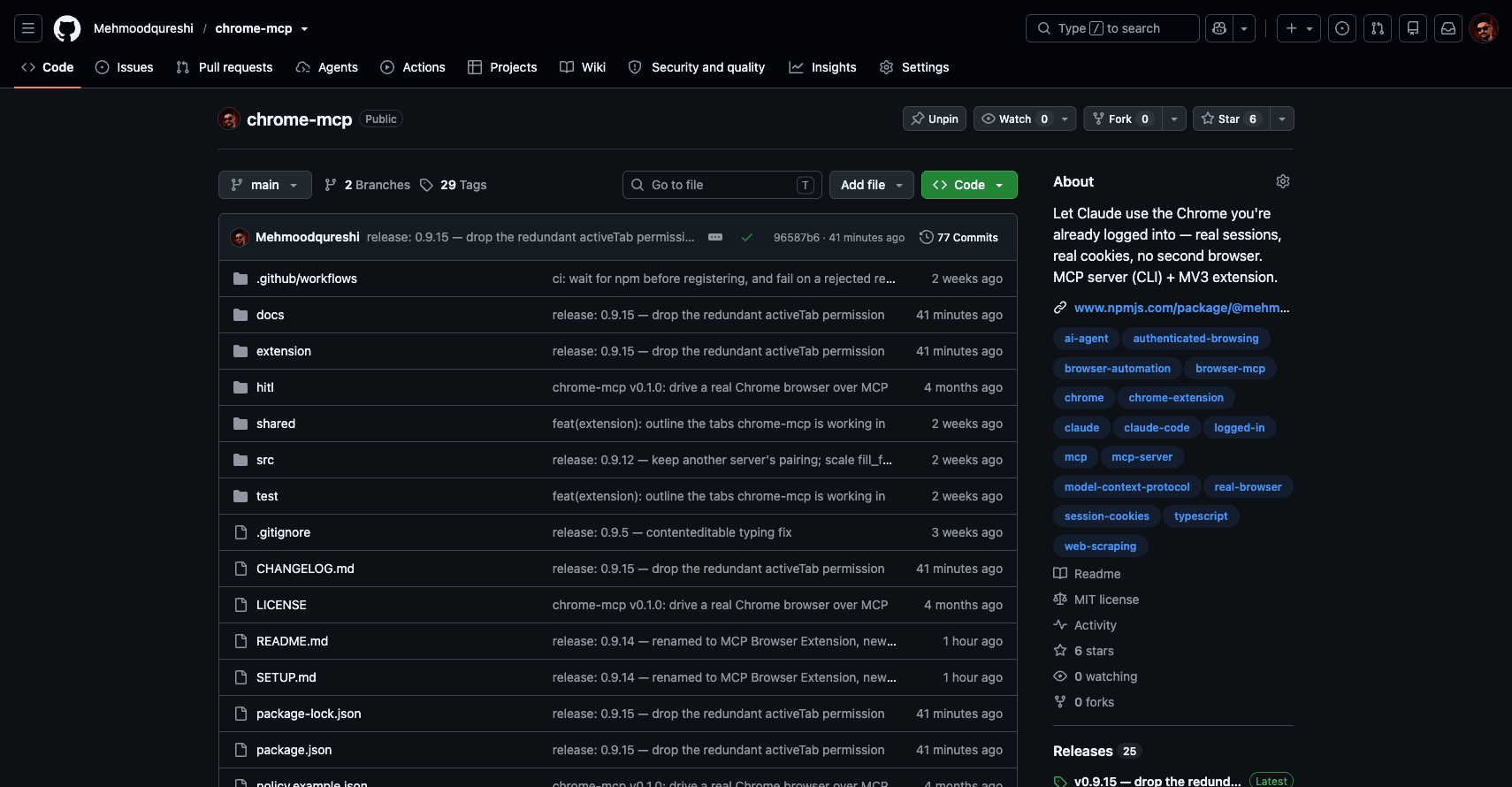
screenshot tool on 9 October 2026. It is the owner's GitHub, signed in: the Settings tab and the Unpin button only appear for the account that owns the repository. A fresh browser would see the public page.Why most browser agents start signed out
Browser MCP servers such as Playwright MCP and Chrome DevTools MCP launch a browser with a profile of their own by default. Every site greets that window as a new visitor, so the agent lands on a sign-in page and you either log in again inside it or hand it saved cookies. Both can now attach to a browser you run, but neither does it by default.
How the browser MCP servers differUse your existing browser instead of a fresh profile
Gmail
Search your inbox and read threads as you, in a background tab. Nothing to authorise, no app password, no OAuth client to register.
GitHub
Go through PRs, issues, Actions runs and settings pages with your own permissions, private repositories included.
Dashboards and admin panels
Pull numbers from analytics, billing, CRM or back-office screens that have no API, or whose API you never set up.
Set it up in Claude Code, Claude Desktop or Cursor
Register the server and name the sites the agent may read. This example allows Gmail and GitHub and nothing else.
Claude Desktop, Cursor and Windsurf take the same arguments in a JSON config; see the quickstart. Add
--enable-mutationsonly if the agent should also click and type.Add the extension to the Chrome you are signed into: MCP Browser Extension on the Chrome Web Store, or load the folder the server unpacks in your home directory. The folder pairs itself; a Web Store install is paired once from its Options page. Either way the toolbar badge turns green.
claude mcp add chrome-mcp -s user -- \
  npx -y @mehmoodqureshi/chrome-mcp \
  --allow-domain mail.google.com \
  --allow-domain github.com \
  --enable-mutations --persist-token
What the agent can and cannot reach
Giving an agent your signed-in browser is only reasonable if you decide what it can touch. Other extensions, such as hangwin/mcp-chrome, also reuse your login state; this is what MCP Browser Extension adds on top of the session.
- Per-domain allowlist, deny-all by default
- With no flags the agent can read nothing. Each
--allow-domainopens exactly one host (*.example.comcovers a domain and its subdomains). Reads are gated as well as clicks, and the extension re-checks the same policy on its side. - Capabilities are separate opt-ins
- Clicking and typing, eval, downloads and uploads each need their own flag. A read-only setup stays read-only.
- Secrets stay out of the transcript
- Password field values are never returned.
--redactscrubs JWTs, cloud keys and bearer tokens out of page reads before the output cap. - Background tabs and batch
- Open pages with
active: falseand read many in onebatchcall, so the agent does not take over the tab you are working in. - Several Chrome profiles
- Load the extension in your work and personal profiles; each pairs under its own name and
profile_useswitches between them. - Expired sessions are named
auth_checkand--fail-on-auth-wallturn a sign-in wall into an[AUTH_REQUIRED]error, so the agent stops and asks you instead of timing out. MCP Browser Extension holds no credentials and never signs in for you.- An audit trail
- Every call lands in
history.jsonlwith the URL, the allow or deny verdict, duration and bytes returned.
Questions
- Can Claude use my existing Chrome login?
- Yes. MCP Browser Extension is an MCP server plus a Chrome extension. The extension runs inside the Chrome you already use, so any site you are signed into is signed in for the agent too, with no re-login and no credentials copied anywhere.
- Is it the only MCP server that uses a signed-in Chrome?
- No. Other extensions, such as hangwin/mcp-chrome, also reuse your login state. MCP Browser Extension differs in its defaults: a per-domain allowlist that starts empty, reads gated as well as writes, password values never returned, optional secret redaction and a per-call audit log.
- Which sites can the agent reach?
- Only the hosts you name with
--allow-domain. Everything else is refused before the call reaches the page.--unsafe-all-domainsexists, and is named that way on purpose. - Does it work with Claude Desktop and Cursor, not only Claude Code?
- Yes. It speaks MCP over stdio, so Claude Code, Claude Desktop, Cursor, Windsurf and any other MCP host can use it.